
Yazi File Manager 2026: Install, Shortcuts, and Terminal Preview
Updated June 2026 with quick-start install commands, core shortcuts, preview dependencies, and terminal workflow tips.
When managing infrastructure and troubleshooting production issues, efficient file navigation is essential. Traditional terminal file managers often struggle with performance and modern features. Yazi addresses these limitations with full async I/O and a rich plugin ecosystem. (github.com/sxyazi/yazi)
Quick Answer
Start here:
# macOS or Linux with Homebrew
brew install yazi

# Rust users
cargo install --locked yazi-fm

# Launch in the current directory
yazi
Useful default keys: j and k to move, l to open, h to go back, / to search names, and S to search file contents with ripgrep.
For a complete terminal setup, pair Yazi with Ghostty or Kitty, Tide or Starship, and cmux for AI agent sessions.
If you are comparing terminal tools from search results, start with Ghostty vs Kitty, then add Yazi for file navigation and cmux when parallel agent sessions need clearer notifications.
What is Yazi?
Yazi (meaning "duck" in Chinese) is a terminal file manager written in Rust that leverages non-blocking async I/O for exceptional performance. Unlike traditional file managers that process operations sequentially, Yazi distributes CPU tasks across multiple threads while handling all I/O asynchronously. This architecture delivers responsive navigation even with large directories and remote filesystems.
Key Features
Full Async Architecture: All I/O operations run asynchronously with CPU tasks spread across threads, maximizing resource utilization without blocking the UI.
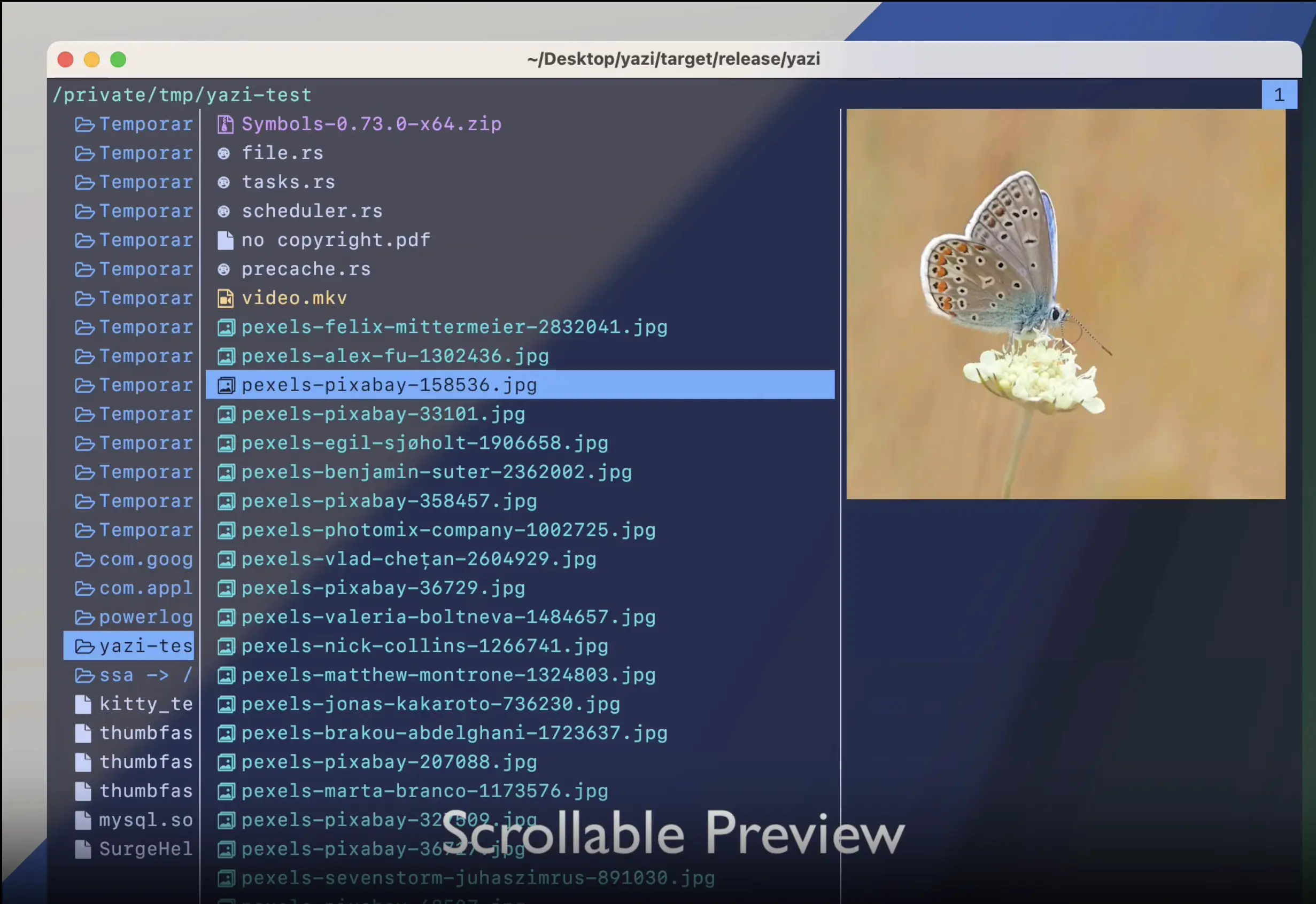
Advanced Image Preview: Built-in support for Kitty, iTerm2, WezTerm, Sixel protocols, plus integration with Überzug++ and Chafa, covering virtually all terminal emulators.
Concurrent Plugin System: Lua-based plugins for UI customization, functional extensions, and custom previewers that execute without blocking the main interface.
Smart Pre-loading: Combined with built-in code highlighting and image decoding, Yazi reads only visible content. If your terminal shows 10 lines, only those 10 are processed, not the entire file.
Vim-like Navigation: Familiar keybindings with visual mode, multi-tab support, cross-directory selection, and auto-completion for paths.
Package Manager: Install plugins and themes with one command, keep them updated, or pin specific versions.
Installation
Install Yazi using your preferred package manager:
Homebrew (macOS/Linux):
brew install yazi
Cargo (Rust):
cargo install --locked yazi-fm
Binary releases: Download precompiled binaries from the releases page for Linux, macOS, Windows, and FreeBSD.
For Arch Linux:
pacman -S yazi
After installation, install optional dependencies for enhanced functionality:
# For file previews
brew install ffmpegthumbnailer poppler fd ripgrep fzf zoxide

# For image previews (optional)
brew install ueberzugpp  # X11/Wayland
Usage
Launch Yazi by running:
yazi
Basic navigation:
j/k: Move down/uph/l: Navigate to parent/child directoryEnter: Open file or directory/: Search filesSpace: Toggle selectiony/p/d: Yank (copy), paste, delete
Advanced workflows:
Multi-tab management:
# Press 't' to create a new tab
# Use '1' through '9' to switch between tabs
# Press 'T' to close current tab
Bulk renaming:
# Select files with Space, then press 'r' for batch rename
# Opens your editor with all selected filenames
File search with ripgrep integration:
# Press '/' to search by name
# Press 'S' to search file contents with ripgrep
Archive preview:
Yazi automatically previews archive contents for .zip, .tar.gz, .7z files and provides extraction options.
Operational Tips
SSH workflow: Install Yazi on jump boxes and bastion hosts for fast log file navigation and analysis. The async architecture prevents UI freezes when working with large log files over high-latency connections.
Plugin automation: Create custom plugins for repetitive tasks like log rotation checks, config file validation, or deployment package preparation. The Lua-based system integrates seamlessly with existing shell workflows.
Git integration: Install the official git.yazi plugin to see repository status, staged changes, and commit history directly in the file manager.
Resource monitoring: Yazi's efficient async design consumes minimal CPU and memory, making it suitable for resource-constrained environments like containers and edge devices.
Conclusion
Yazi reimagines terminal file management with modern async architecture, comprehensive image preview support, and extensive customization. Its performance characteristics and plugin ecosystem make it valuable for SRE teams managing complex infrastructure.
For automated incident response and intelligent alert management, explore Akmatori. Akmatori reduces on-call burden through automated troubleshooting and context-aware escalation.
For reliable infrastructure hosting, check out Gcore for high-performance virtual machines and bare metal servers globally.